The Teacher's Guide to BuzzerBug: Cognitive Science, Instant Quiz Generation, and Active Recall in the Modern Classroom
A research-backed tutorial for educators: how cognitive load and retrieval practice drive durable retention, why 8–12 questions is the engagement sweet spot, and how to launch AI-generated classroom quizzes in 60 seconds with zero student logins.
2026-08-28 · 12 min read · BuzzerBug Editorial Team
Beyond the Passive Lecture: The Illusion of Competence
Every teacher recognizes the Friday morning paradox: on Tuesday, the class nodded attentively as you explained cellular respiration or quadratic functions; on Friday, half the room stumbles over basic definitions on the quiz.
This disconnect is not a lack of effort from students or poor delivery from the teacher. Cognitive scientists call it the illusion of competence. When information is presented clearly through a slide deck or lecture, it creates an experience of processing fluency. Because the concept makes intuitive sense while listening, the student's brain misinterprets ease of comprehension as permanent encoding. In reality, passive listening leaves superficial neural traces that decay within hours.
To transform temporary comprehension into durable working memory, students must do the heavy cognitive lifting themselves. This field guide provides an evidence-based roadmap for educators to replace passive lecturing with interactive retrieval practice using BuzzerBug. We examine the cognitive architecture of student learning, dissect why low-stakes quizzing outperforms traditional studying, explain the exact question counts that sustain classroom engagement, and walk through launching curriculum-aligned AI quizzes in under 60 seconds.
1. The Cognitive Science of How Students Learn
Effective classroom technology must align with how the human brain actually processes, organizes, and retains information. Three foundational frameworks govern modern learning design:
Cognitive Load Theory and the Working Memory Bottleneck
Pioneered by educational psychologist John Sweller, Cognitive Load Theory (CLT) models human memory into two components: a virtually unlimited long-term memory and an extremely constrained working memory. Working memory can simultaneously juggle only $4 pm 1$ novel information chunks before experiencing cognitive overload.
Sweller categorized cognitive load into three distinct channels:
- Intrinsic Load: The inherent difficulty of the academic content itself (e.g., balancing a chemical equation vs. spelling a vocabulary word).
- Germane Load: The productive mental effort directed toward constructing schemas—the mental models stored in long-term memory.
- Extraneous Load: Mental effort wasted on factors unrelated to learning, such as deciphering clunky software, resetting lost passwords, or navigating confusing classroom procedures.
In tech-heavy classrooms, extraneous cognitive load is the silent killer of learning. When an educational tool requires students to download an application, remember a 12-character school login, verify an email address, or stare at a chaotic user interface, their working memory is saturated before they have read a single question.
Dual Coding Theory: Synchronizing the Smartboard and the Handheld
Allan Paivio's Dual Coding Theory posits that the human mind processes verbal information (words, speech, text) and nonverbal information (images, spatial layouts, visual cues) through distinct, parallel cognitive subsystems. When instructional design activates both subsystems simultaneously, learning pathways multiply, resulting in recall rates up to double that of text alone.
BuzzerBug leverages dual coding through its split-display architecture:
- The Shared Visual Anchor (TV View): Projected onto the classroom Smartboard or main screen, the TV view provides high-contrast typography, category headers, dynamic countdown timer rings, and illustrative diagrams that ground the entire room in a shared spatial experience.
- The Tactile Controller (Student Device): In their hands, students interact with clean, distinct tactile inputs—large colored buttons or a single responsive buzzer—connecting physical action to visual stimuli.
The Forgetting Curve and Spaced Retrieval
In 1885, psychologist Hermann Ebbinghaus mapped the mathematical decay of memory over time. Without reinforcement, human learners lose roughly 50% of new information within one hour and up to 80% within 24 hours.
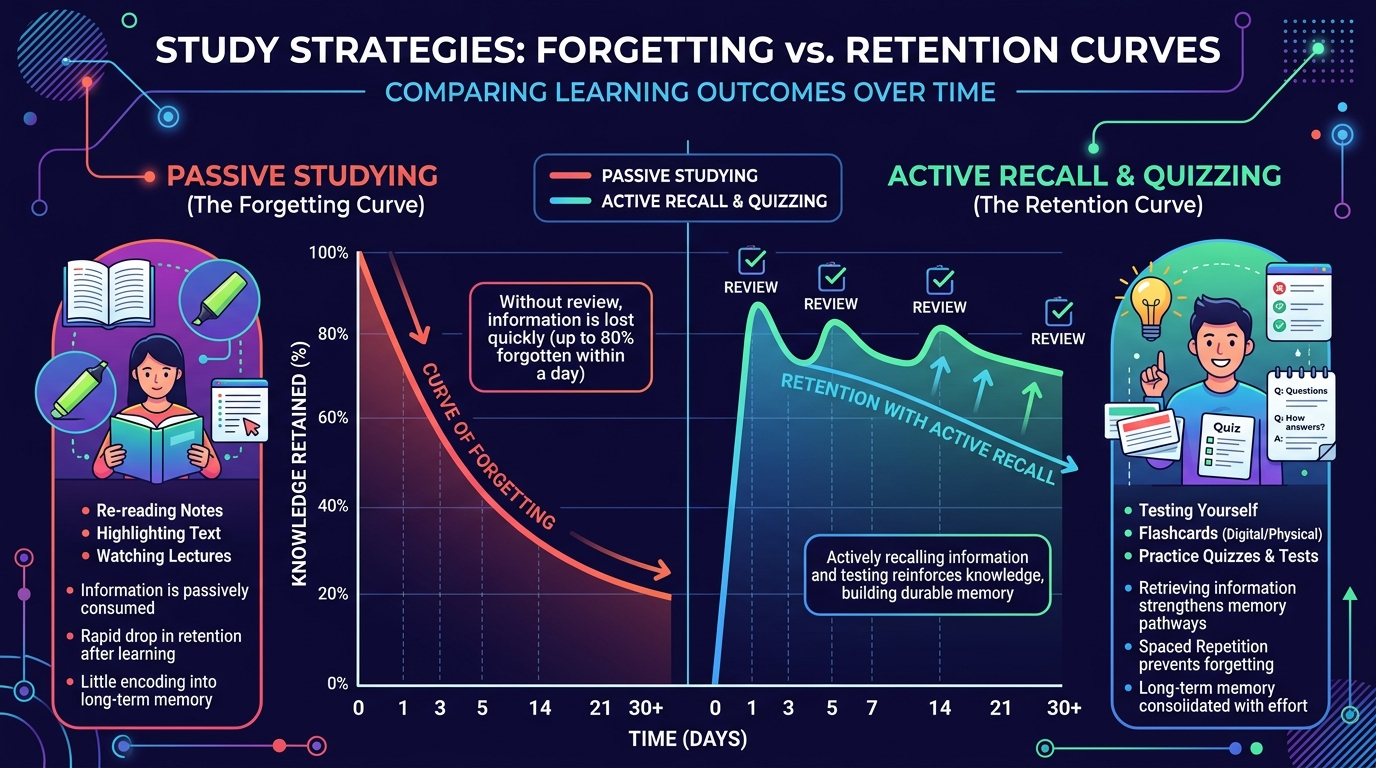
As shown in the cognitive retention study above, traditional study methods like highlighting passages or re-reading notes produce almost no resistance against this decay curve. However, when learners are prompted to actively retrieve that information at spaced intervals (Day 1, Day 3, Day 7), each retrieval event resets the decay curve at a higher baseline, flattening the forgetting trajectory and anchoring the concept into permanent memory.
2. Why Quizzing Is Superior for Long-Term Memorization
For decades, quizzes were treated purely as summative measurement tools—instruments to grade students after learning had already concluded. Cognitive psychology has dismantled this view: the quiz is not a measurement of learning; the quiz is the learning intervention itself.
The Testing Effect (Retrieval Practice)
In their seminal 2006 study published in Psychological Science, researchers Henry Roediger and Jeffrey Karpicke compared students who spent equal time either repeatedly studying material or taking retrieval practice tests. One week later, the testing group outperformed the study group by over 50% on long-term retention.
When a student reads a textbook paragraph, information flows inward passively. But when a student sees a question on the classroom Smartboard and reaches into their brain to retrieve the answer, their neural network must reconstruct the memory trace from scratch. This act of effortful retrieval strengthens synaptic connectivity, organizes knowledge into interconnected schemas, and signals to the brain that the concept is critical for survival.
The Pretesting Effect: Priming the Brain Before Instruction
Quizzing is not only useful after a lesson—it is equally potent before a topic is taught. Research by Richland, Kornell, and Kao (2009) demonstrated the Pretesting Effect: attempting a question before receiving direct instruction primes intellectual curiosity and activates relevant schema.
Even when students guess incorrectly on a pretest question, their brains identify specific knowledge voids. When the teacher subsequently explains the concept during the lesson, the students' attention mechanisms automatically snap onto the missing information, dramatically accelerating comprehension.
The Hypercorrection Effect
What happens when a student buzzes in with an answer they are completely convinced is right, only to find out they were wrong?
Under traditional grading, this causes frustration. But in a fast-paced, interactive buzzer environment, it triggers the Hypercorrection Effect (Butterfield & Metcalfe, 2001). When high-confidence errors are met with immediate, non-punitive corrective feedback, the resulting surprise triggers an intense dopaminergic response. The brain rapidly overwrites the faulty model with the correct fact. Because BuzzerBug provides immediate visual confirmation and teacher-led explanation cards, misconceptions are corrected before they can solidify.
Psychological Safety vs. Amygdala Hijack
Traditional classroom questioning often relies on "cold calling" or picking the first student who raises their hand. This dynamic carries two structural flaws:
- Extrovert Dominance: The same four assertive students answer every question, while the remaining twenty-five disengage into passive spectatorship.
- Amygdala Hijack: For introverted, shy, or neurodivergent students, being put on the spot triggers acute cortisol release, shutting down prefrontal cortex reasoning in favor of a freeze response.
BuzzerBug's Multi-Winner (Everyone Answers) mode neutralizes this anxiety completely. Every student submits their response privately on their own screen within the countdown window. There is no public humiliation for a wrong guess, no pressure to speak over loud peers, and 100% active participation across the entire roster.
3. The Engagement Curve: How Many Questions Is Ideal?
A common pitfall among enthusiastic educators is building 30-question marathons. While well-intentioned, excessively long quizzes backfire due to cognitive fatigue.
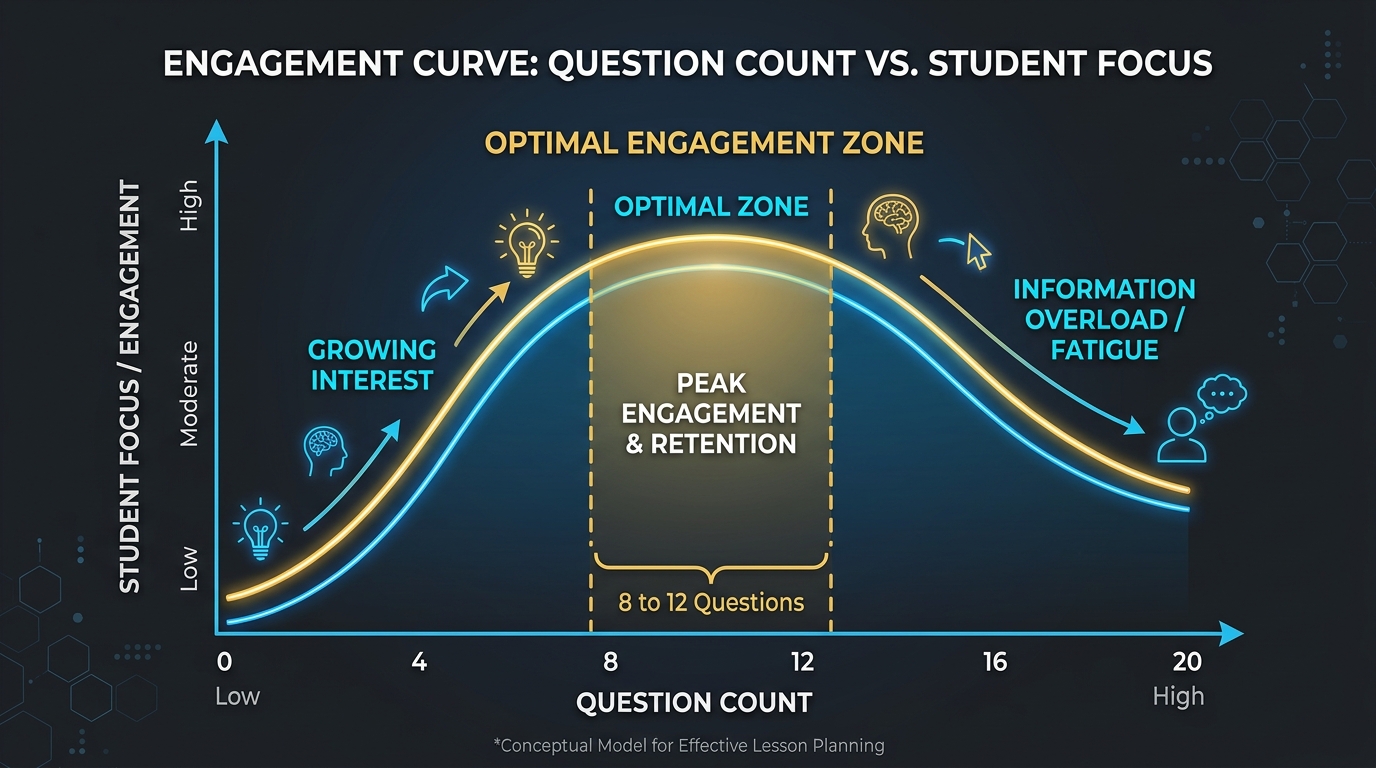
Educational attention research reveals that student engagement during digital gamified learning follows an inverted-U curve:
The 8 to 12 Question "Golden Zone"
As illustrated in the engagement curve above, student interest builds through the first 3 questions as they adapt to the format, calibrate their devices, and settle into the challenge. Peak engagement and retention occur between 8 and 12 questions. In this window:
- Adrenaline and motivation remain elevated without causing cognitive exhaustion.
- The leaderboard stays dynamic; students who trail early still have a realistic mathematical opportunity to catch up.
- Lesson momentum stays crisp, leaving adequate time for teacher-led elaboration and discussion.
The 15+ Question Disengagement Cliff
Once a quiz crosses 15 questions, student performance and behavior deteriorate rapidly:
- Click Fatigue: Response times drop from thoughtful evaluation (15–20 seconds) to reflexive button-mashing (2–4 seconds) as students rush to finish.
- Learned Helplessness: Trailing students realize they cannot bridge the point deficit and mentally check out.
- Diminishing Returns: The cognitive benefit of the 18th question is less than 15% of the benefit gained from the 4th question.
Pacing Breakdown by Classroom Archetype
Different lesson phases call for different question counts and timers:
| Classroom Phase | Question Count | Time Allocated | Recommended Timer | Pedagogical Goal |
|---|---|---|---|---|
| Bell-Ringer / Do-Now | 3–5 questions | 4–6 minutes | 20–30s per question | Activate prior knowledge from yesterday; settle the room immediately as the bell rings. |
| Mid-Lesson Dipstick | 3–5 questions | 5–8 minutes | 30–45s per question | Formative checkpoint to verify understanding before releasing to independent group work. |
| Lesson Wrap-Up / Exit Ticket | 5–8 questions | 8–10 minutes | 25–35s per question | Consolidate core lesson objectives; identify concepts needing re-teaching tomorrow. |
| Unit Review / Friday Game Day | 8–12 questions | 15–20 minutes | 30–60s per question | Comprehensive retrieval across units; team collaboration, high-energy gamified synthesis. |
4. Step-by-Step Tutorial: Generating and Running a BuzzerBug Quiz
BuzzerBug is designed to take an educator from a blank screen to a running classroom game in under two minutes. Here is the complete operational workflow.
Step 1: Open the Teacher Hub
Open your browser and navigate to Class Mode. BuzzerBug’s teacher workspace is completely accountless—it automatically generates and stores your secure teacher key in your local browser, allowing you to access live class reports without entering passwords or dealing with district single-sign-on (SSO) blockers.
Step 2: Instant AI Generation from Curriculum Standards
Instead of spending an entire planning period writing multiple-choice questions from scratch, let BuzzerBug’s educational AI generate them directly from your curriculum standards:
- Click on the Generate New tab in the class workspace.
- Enter your lesson topic or standard into the topic field. Be as specific as you like:
- "Photosynthesis: light-dependent reactions and Calvin cycle for Grade 9 Biology"
- "American Revolution: Stamp Act, Boston Tea Party, and Intolerable Acts"
- "Equivalent fractions, decimals, and percentages for Grade 6 Math"
- Select your desired difficulty tier (Easy, Medium, Hard, or Mixed).
- Set your question count (choose 10 questions for a standard review session).
- Click Create & Launch. The AI crafts balanced questions complete with 4 plausible distractors, the verified correct answer, and an instructional explanation.
Step 3: Fine-Tuning with the Class Quiz Editor
If you wish to customize questions before play, open the built-in Class Quiz Editor. You can:
- Modify question wording to match the exact phrasing in your district textbook.
- Replace or reorder distractors to target known class misconceptions.
- Add specific hints or contextual notes that will appear during the answer reveal.
Step 4: Setting Up the Classroom Displays
BuzzerBug uses a split dual-screen architecture designed specifically for educational environments, cleanly separating what the room sees from what the teacher controls:
- The Smartboard TV View (
/tv/:roomCode):
Project this dedicated spectator screen onto your classroom interactive whiteboard, projector, or front-of-room TV (accessible directly from your host console via "Open TV Screen"). Specially formatted for high-contrast viewing across a 30-foot room, the TV view acts as the central classroom anchor:
- Displays the active question prompt and large, legible answer choices.
- Shows dynamic countdown rings and real-time response counters so students know how much time remains.
- Reveals aggregated answer distributions and an animated leaderboard after each question without prematurely exposing correct answers.
- The Teacher Host Console (
/host/:roomCode):
Keep this command dashboard private on your laptop, tablet, or teacher podium workstation. The host console puts complete pedagogical pacing at your fingertips:
- Pacing & Timers: Start question timers when the room is settled, or extend the countdown if students need additional calculation time.
- Instructional Pauses: Freeze the clock at any moment to address emergent confusion or lead a brief 60-second micro-lecture.
- Diagnostic Insights: Preview incoming response distributions before revealing them on the main board, helping you anticipate which distractor misled the class.
- Manual Scoring & Adjudication: Manually award bonus points or adjust tallies for insightful verbal justifications during classroom discussions.
Step 5: Frictionless Student Onboarding
When you launch your session, the Smartboard TV view automatically displays a high-visibility QR code alongside a simple 4-letter room code.
Instruct your students:
"Take out your Chromebooks, iPads, or phones. Scan the QR code on the board, or visit buzzerbug.com/join and enter the 4-letter room code. Type your first name and tap Join."
Because BuzzerBug runs natively in any standard web browser, there are no app store downloads, zero account registrations, and no forgotten password delays. Within seconds:
- Every student device connects directly to your classroom lobby via low-latency WebSockets.
- The student's screen automatically synchronizes with the active game state, transforming into a responsive, color-coded tactile input interface.
- An entire roster of thirty students can join, authenticate locally, and be ready to answer in under 45 seconds—preserving precious instructional time.
Step 6: Choosing the Right Game Mechanic
BuzzerBug supports two core interaction modes. Pick the one that aligns with your lesson objective:
- Everyone Answers (Multi-Winner Mode): Recommended for 90% of classroom instruction. Every student submits an answer simultaneously on their device before the timer expires. Every correct student earns points. This guarantees universal engagement, eliminates passive spectatorship, and provides true class-wide diagnostic data.
- First-to-Buzz Mode: The classic game-show lockout buzzer. When a question is displayed, the first student to tap their buzzer claims the exclusive right to answer verbally. Use this for 5-minute high-energy vocabulary warmups or end-of-unit lightning rounds.
5. Three Battle-Tested Lesson Playbooks
Here are three concrete, classroom-tested formats ready to drop into your weekly lesson plans:
Playbook A: The 5-Minute "Do-Now" Retrieval Bell-Ringer
- When: The first 5 minutes of class, right as the bell rings.
- Format: 3 to 4 questions. Everyone Answers mode. 25-second timer.
- Structure:
- Question 1: Core vocabulary term taught yesterday.
- Question 2: Foundational concept taught earlier this week.
- Question 3: A tricky concept taught last week (spaced repetition).
- Execution: Have the QR code projected as students enter the room. Students immediately join and answer without waiting for instruction. Once the 4 questions conclude, spend 90 seconds reviewing the single question that had the lowest accuracy score, then transition immediately into today’s direct instruction.
Playbook B: The Mid-Lesson Formative Dipstick
- When: 20 minutes into a lecture or lab, right after introducing a new concept.
- Format: 3 questions. Everyone Answers mode. Untimed or 45-second timer.
- Objective: Collect immediate diagnostic data before sending students into independent homework or group projects.
- Rule of Thumb:
- Over 80% class accuracy: The class understands the concept; move directly into independent practice.
- 50%–80% accuracy: Conduct a 3-minute peer-instruction breakout where neighboring students discuss why their answers differed, then re-poll.
- Under 50% accuracy: Stop immediately. Do not assign the practice worksheet; reteach the concept using an alternative visual or analogy.
Playbook C: The Collaborative Team Buzzer Tournament
- When: Friday review days or pre-exam study sessions.
- Format: 10 questions. Teams of 3 to 4 students. First-to-Buzz mode with difficulty weighting (10 pts for Easy, 20 pts for Medium, 30 pts for Hard).
- Structure: Students collaborate in small clusters sharing one device as their team buzzer. Questions appear on the Smartboard with a 5-second "reading lockout" to enforce team discussion before the buzzer unlocks.
- Pedagogical Impact: Team play relieves individual anxiety while sparking peer explanation—the student who knows the concept must rapidly explain their reasoning to teammates before buzzing in.
6. Real-Time Diagnostics & Differentiated Instruction
The true pedagogical power of digital quizzing lies in the data generated during gameplay. Rather than discovering learning gaps over the weekend while grading paper quizzes, BuzzerBug provides actionable diagnostic data in real time.
Reading the Live Accuracy Heatmap
During the answer reveal, BuzzerBug displays the percentage distribution of student responses across all four options:
- If 85% of students selected Option B (Correct), give a quick celebratory nod and advance the game.
- If 45% selected Option B (Correct) but 40% selected Option D (Distractor), you have uncovered a specific, class-wide misconception. Pause the game, expand the explanation card on the Smartboard, and explicitly address why Option D was an enticing trap before moving on.
Exporting Reports for Gradebooks & Intervention
After closing a class session in Class Mode, teachers can export a complete CSV performance report. The report details:
- Individual student accuracy scores and completion percentages.
- Per-question difficulty breakdowns across the entire cohort.
- Specific students who missed three or more consecutive questions, allowing you to schedule targeted small-group interventions during study hall or office hours.
Classroom Quickstart Checklist
Print this checklist or keep it handy at your teaching station:
- [ ] Display Ready: Open the TV View (
/tv/:roomCode) on your Smartboard/projector. - [ ] Host Control: Open
/host/:roomCodeor your/teachdashboard on your teacher laptop/tablet. - [ ] Question Count Check: Verified 3–5 questions for warmups, or 8–12 questions for reviews.
- [ ] Mode Selected: Everyone Answers (Multi-Winner) for formative checks; First-to-Buzz for lightning games.
- [ ] Negative Marking Disabled: Ensure penalties are turned off so struggling students feel safe guessing.
- [ ] Timer Pacing: 25 seconds for recall questions; 45–60 seconds for math and reasoning.
- [ ] Elaboration Buffer: Spend 30 seconds after tough questions discussing why the correct answer is true.
Summary: Teach Less, Retrieve More
Real learning is not measured by how much content a teacher covers in a 50-minute lecture—it is measured by how much knowledge students can successfully reconstruct when called upon.
By replacing passive presentations with low-stakes interactive retrieval, respecting the 8–12 question engagement threshold, and leveraging friction-free technology that protects student cognitive load, you transform your classroom from a room of passive listeners into an energetic community of active thinkers.
Ready to launch your first interactive classroom quiz? Generate a free quiz in BuzzerBug Class Mode in under 60 seconds.
Ready to Play?
Create a free game room in seconds. No download, no account needed for players.
Start a Free Quiz Game